Build a Roblox Game with AI
Your kid already plays Roblox. Now they can build their own.
Three Saturdays. Ten kids per group. One playable game they designed and built themselves.
- Ages 10–13
- Downtown Brooklyn
- 10 kids maximum per group
- Oct 17 – Nov 7, 2026
- 90 minutes · four time choices
All Saturday time slots are sold out. Times shown are Brooklyn local time.
They finish with a game people can actually play.
Each student starts with a small game idea and builds a playable Roblox project with guided help. In the final session they present it to families at the showcase. Publishing to Roblox is supported where Roblox's account and platform requirements allow, with a parent's approval.
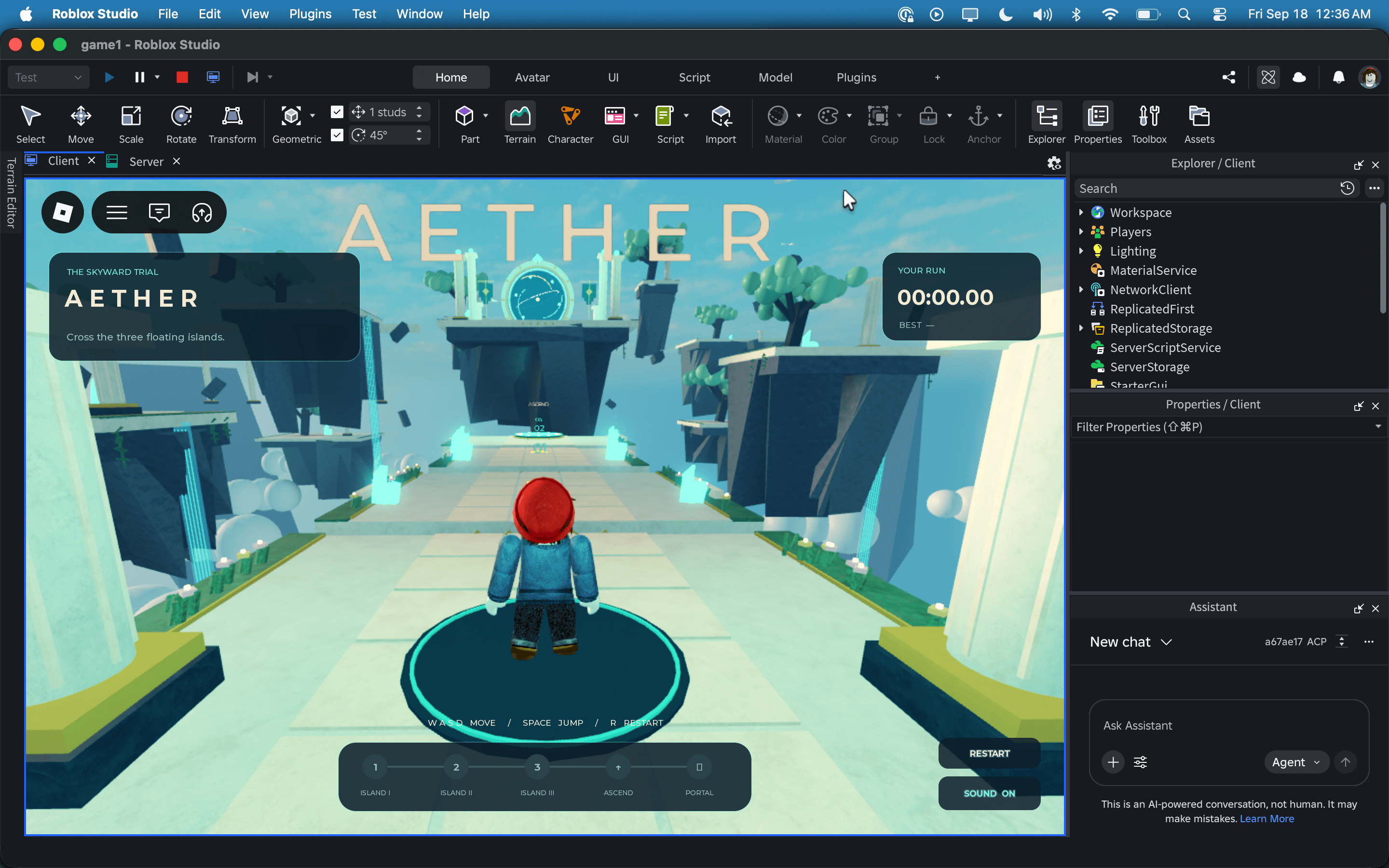
Aether in Roblox Studio · students build a smaller project with one core mechanic over three classes
01
Idea
What does the player do, and why is it fun?
02
Design
Sketch the world, the rules, the win.
03
Build
Roblox Studio, Luau, and an AI they direct.
04
Test
Watch people play. Fix what breaks.
05
Showcase
Present a finished game to families.
What they learn
Students learn to prompt an AI for code, inspect what it produces, catch its mistakes, debug the result, and improve it themselves.
The AI is a tool they direct, not a substitute for thinking. Knowing when to trust it and when not to is the judgment we're teaching, and it's part of the critical-thinking curriculum, not a shortcut around it.
Student prompt
Make the coin disappear when a player touches it and add 1 to their score.
AI
coin.Touched:Connect(function(hit)
  local player = game.Players[hit.Parent.Name]
  player.leaderstats.Coins.Value += 1
  coin:Destroy()
end)
Student, week 4
Crashes when a crate or the lava touches the coin, because those aren't players. Swapped the lookup for GetPlayerFromCharacter and added a nil check.
- local player = game.Players[hit.Parent.Name]+ local player = game.Players:GetPlayerFromCharacter(hit.Parent)+ if not player then return end
1local coin = script.Parent2local collected = false34coin.Touched:Connect(function(hit)5 local player = game.Players:GetPlayerFromCharacter(hit.Parent)6 if player and not collected then7 collected = true8 player.leaderstats.Coins.Value += 19 coin:Destroy()10 end11end)
- Game design and systems thinking
- How a loop of goals, obstacles, and rewards makes something fun.
- Roblox Studio
- The real tool. Terrain, parts, lighting, physics, and Luau scripting.
- AI-assisted programming
- Prompt for code, read it, catch the mistakes, fix them, make it better.
- Debugging and iteration
- Things break. Learning to find out why is the skill.
- Creative problem solving
- Constraints, trade-offs, and choosing what to cut.
- Turning an idea into a working product
- From a sentence on a whiteboard to something other people can play.
Founding cohort · 3 Saturdays · 10 kids per group
$495
Early-signup tuition. Covers all three 90-minute classes, parent updates, and a short family showcase.
Small on purpose. Up to ten kids per group, with guided building and individual help.
Founding families get first pick of seats in the next cohort.
- Dates
- Sat, Oct 17
- Sat, Oct 24
- Sat, Nov 7
Three Saturdays. No class on Halloween.
- Time
- 10–11:30 am / 12–1:30 pm / 2–3:30 pm / 4–5:30 pm. Choose one time for all three Saturdays. Each class is 90 minutes; all times are Brooklyn local time.
- Where
- Downtown Brooklyn. Exact venue confirmed before the program begins.
- Refund
- Cancel 14 or more days before the first class for a full refund. See Refund Policy for later cancellations. If we cancel your group, you’ll receive a full refund.
- Ages
- 10–13, 10 students maximum per group
- Bring
- A Mac or Windows laptop with Roblox Studio installed before class
- Includes
- Weekly parent updates and the final family showcase
You'll know how it's going every week.
A short note each Saturday: what your child built, where they got stuck, and what's coming next. No portal, no app.
The final class includes a short family showcase within your usual 90-minute time slot.
FromCritical Tinkering
ToMaya's parents
SubjClass 2: Maya's first script that works
Quick one from Saturday.
Built: the jump pad works and she wrote the coin-collection script herself after one nudge.
Stuck on: making the lava send you back to spawn. She checked the AI's suggestion and found the missing reset.
Next: playtesting and improvements. Our short family showcase is November 7, within your usual class time.
Three Saturdays
A focused 4.5-hour introduction: build a small world, add a mechanic with AI, and test and share the result.
- Class 01
Design and build a small world
Choose a simple game idea, sketch what the player does, and build a small world in Roblox Studio.
- Class 02
Add a mechanic with AI
Create one game mechanic with Luau and AI assistance. Read the suggested code, test it, and debug what does not work.
- Class 03
Playtest, improve, and share
Try each other’s games, make improvements, and share a playable project with families in a short showcase within your usual class time.
Class 02 · the Output window, before and after the fix
13:42:07 Players.Platform is not a valid member of Players "Players"
13:42:07 Stack Begin
13:42:07 Script 'Workspace.Coins.Coin.CoinScript', Line 2
13:42:07 Stack End
— edited CoinScript, restarted playtest —
13:46:22 Coin collected → Maya (1)
13:46:25 Coin collected → Maya (2)
13:46:31 Platform bumped a coin, ignored
Class 03 · playtest notes
Playtest 2 · Skybreak · week 5
4 testers
- Leo, 11Jump pad sends you over the towerFix
- Priya, 12Didn't notice the lava was lavaFix
- Sam, 10Wanted more coins on the towerKeep
- Ava, 13Spawn is too far from the actionCut
How we teach
Small groups. Big room to think.
Every student builds a game of their own. Short demonstrations lead into hands-on work, with individual guidance when they get stuck and time to explain what they discovered.
Start with their idea
Students choose what they want to make, then break it into small, achievable steps. Each new skill helps bring their game to life.
Make the thinking visible
We ask students to predict what their code will do, test it, and explain what happened. Mistakes become something they can investigate and fix.
Question the AI
Students learn to write prompts, read the code AI suggests, and check whether it works. They practice explaining and changing the result themselves.
Build confidence through feedback
With up to ten students per group, there is room for individual help. Playtesting with peers and a family showcase give students practice sharing their work and using feedback.
The best way to learn how things work is to build them.
Critical Tinkering is a play on critical thinking. Kids don't get better at thinking by being told to. They get better by making decisions, hitting problems, testing solutions, and improving what they made. A game is a good place to practice because it's honest: either it works and it's fun, or it isn't yet.
Ninety minutes each Saturday of creating instead of consuming, with a finished thing at the end that they can show people.
Think critically. Build creatively.
Parent questions
Something else? Email us and you'll get a real reply.
What is the cancellation and refund policy?
You can cancel for a full refund 14 or more days before the first class. Cancellations at least 7 but fewer than 14 days before the first class are eligible for a 50% refund or full credit toward a future Critical Tinkering program. Cancellations fewer than 7 days before the first class are nonrefundable, though we may offer program credit when possible. You may also cancel within 24 hours of purchase for a full refund as long as the first class has not started. If Critical Tinkering cancels your group, you will receive a full refund.
Do we attend all four time slots?
No. Choose one time slot at signup and attend that same time on October 17, October 24, and November 7. Each class lasts 90 minutes, with a maximum of ten children per group. There is no class on Halloween.
What does the $495 early-signup price cover?
The full three-class program for one child, parent updates after each class, and a short family showcase during the final class. Payment is due in full at signup. We have not announced a deadline or a regular price yet.
Does my child need coding experience?
No. We start from zero. Students who have coded before will move faster on the scripting activities, but the design, building, and testing work is new to everyone.
Does my child need to already play Roblox?
It helps but isn't required. Most students arrive as players. The first week is about switching from playing games to thinking about how they're made.
What computer do they need?
A Mac or Windows laptop they can bring each Saturday, made in the last five or six years, with a charger. Roblox Studio does not run on iPads or Chromebooks. We send setup instructions a week before the program. Please install Roblox Studio and check your account before the first class; email us if you need help.
How is AI used?
As a tool the student directs, never as a substitute for their own thinking. Students learn to prompt an AI for code, inspect what it produces, catch its mistakes, debug the result, and improve it themselves. That judgment is part of the curriculum, not a shortcut around it.
Is this safe?
Instructors are background-checked. During class, students work inside Roblox Studio, the development tool, not the public game. No chat with strangers, no in-game purchases, and no public listing without a parent's say-so. We'll walk you through the account settings we use.
Will my child's game be published?
Every student finishes with a playable project and presents it at the final showcase. Publishing to Roblox is supported where Roblox's account and platform requirements allow, and always with a parent's approval.
How will I know how it's going?
You'll get a short progress update each week with what your child built, what they got stuck on, and what's next. The program ends with a family showcase where students present their finished games.
What happens if my group doesn't fill?
Each time slot needs at least five paid students to run. If your group does not reach that minimum, it will be cancelled and you will receive a full refund within a few days. We will notify you by October 10, a week before the first class.
Where in Brooklyn will it be held?
The founding cohort will be held in Downtown Brooklyn. Exact venue will be confirmed before the program begins.
Bring Critical Tinkering to your school
Our guided game-building approach, offered in a longer format as after-school enrichment or an in-school block. Parents welcome to start the conversation on behalf of their school.
Ten kids per group. Three Saturdays. One game they built themselves.
Cancel 14 or more days before the first class for a full refund. See Refund Policy for later cancellations. If we cancel your group, you’ll receive a full refund.
Know a family who'd want this? Send them this page.
Showcase · Saturday November 7